AcidBoxMynah is an alternative firmware that turns the Mynah into an acid groovebox.
Based on the open source AcidBox project. It provides:
[an] acid combo of tb303 + tb303 + tr808 like synths. Filter cutoff, reso, env mod, accent, wavefolder, overdrive within each 303, per-instrument tunings, hi-pass/lo-pass filter and bitcrusher in drums, send to reverb, delay and master compression
While the original project is headless, the AcidBoxMynah fork provides direct control with the Mynah hardware and adds a number of additional features detailed in the user Manual below. Like the original firmware, the AcidBoxMynah is open source and made available under the MIT license.
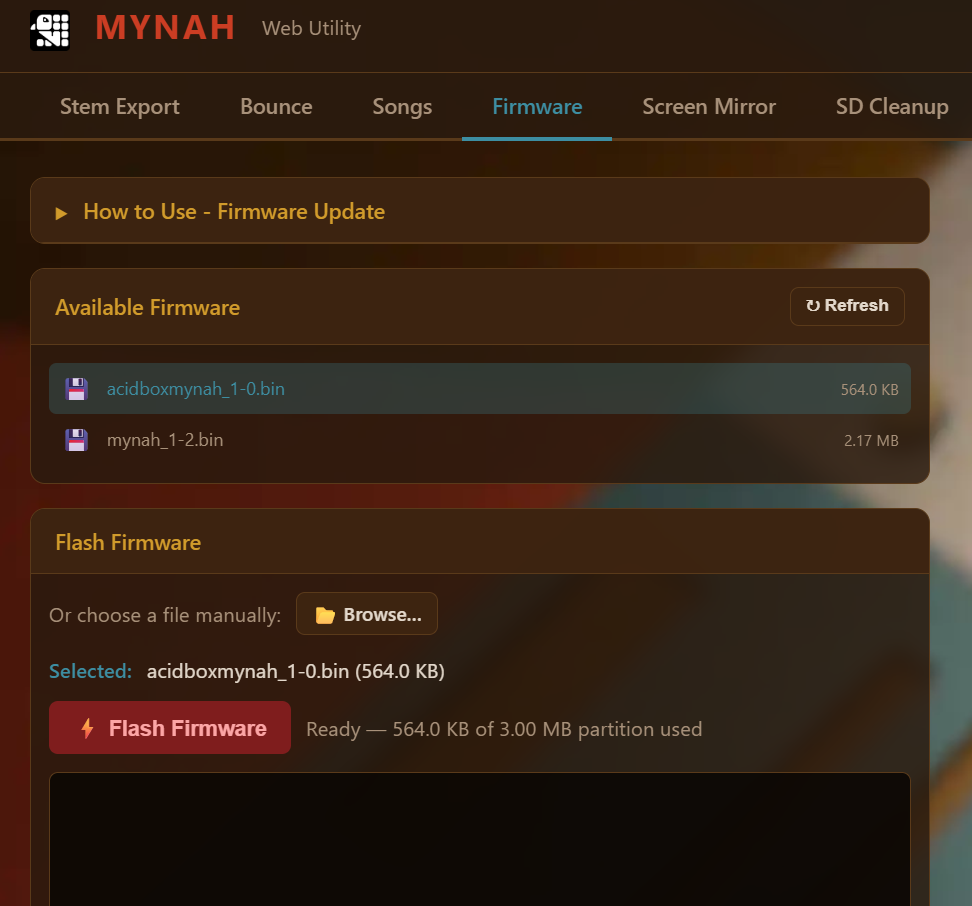
To switch to AcidBoxMynah, flash the firmware in the firmware tab of the Mynah webapp. Follow the How to Use instructions on that page.
NOTE: The following webapp tabs are not supported with the AcidBoxMynah firmware: Stem Export, Bounce, Songs, Screen Mirror, and SD Cleanup.
AcidBoxMynah files and samples live in their own AcidBox folder on the SD card and won’t overwrite or conflict with standard Mynah files. It’s safe to switch between the standard Mynah firmware and AcidBoxMynah firmware at will.
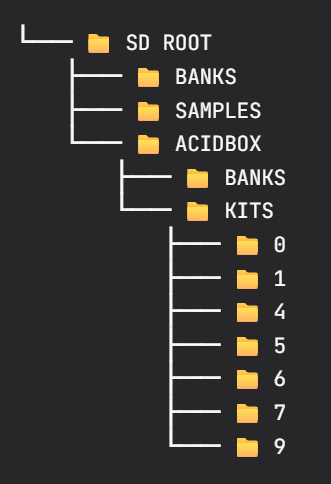
Mynah kits shipped after the release of AcidBoxMynah already have sample files for additional drum kits in place on the bundled SD card. For earlier kits, download and place the following folder on the Mynah’s SD card: KITS.zip
Unzip the folder and ensure the SD directory structure looks like this:
AcidBoxMynah User Manual
User Manual V1.0
Overview
Firmware Features
The original AcidBox is a great-sounding TB-303 emulation with two synth parts and a drum part. AcidBoxMynah puts that engine to work on the Mynah hardware, providing it with a full physical UI.
Key Hardware Features
24 tactile switches (16 step buttons + 8 function keys).
Single potentiometer for parameter control.
OLED display.
8×2 NeoPixel grid for sequencing and visualization.
Sequencing & Automation
16-step sequencer with per-step note, accent, and slide editing.
16-lane synth automation and 8-lane drum automation.
Scale quantization, swing, and BPM control.
Dual modes: autonomous Jukebox Mode or manual Sequencer Mode.
System & UI Improvements
Runtime drum kit browsing and pattern/song/drum kit SD card organization.
Per-voice mute toggling and quick volume shortcuts (F-key + pot).
Pot-lock protection to prevent unexpected parameter jumps during mode changes.
Decoupled UI polling (Core 0 @ 200Hz) from the real-time audio pipeline (Core 1).
Control Reference
Transport
Button
Function
F8
Start / Stop (Toggle)
Operating Mode
Button Combo
Function
F1 + F8
Sequencer Mode / Jukebox Mode (Toggle)
Part Select
Button
Part
F2
SYNTH 1
F3
SYNTH 2
F4
DRUMS
Part Mute
Button
Function
F2 (double-press)
SYNTH 1 (Toggle Mute)
F3 (double-press)
SYNTH 2 (Toggle Mute)
F4 (double-press)
DRUMS (Toggle Mute)
Drum Voice Selection
Kit folders are numbered on the SD. Legacy kits (from the original AcidBox project) are loaded in the order that files appear on the SD – the new format explicitly looks for a filename prefix to map files to instruments. The total size for a kit is about 1.5MB. The following file format is recommended: .WAV, 44,100 Hz mono, 16-bit PCM.
Button Combo
Drum Voice
MIDI Note (Chan. 10)
SD File Prefix
F4 + A1
BD (Bass Drum)
16
01_
F4 + A2
SD (Snare Drum)
17
02_
F4 + A3
CH (Closed Hi-Hat)
22
03_
F4 + A4
OH (Open Hi-Hat)
23
04_
F4 + A5
CLAP (Hand Clap)
20
05_
F4 + A6
LT (Low Tom)
18
06_
F4 + A7
MT (Mid Tom)
19
07_
F4 + A8
HT (High Tom)
21
08_
F4 + B1
CR (Crash Cymbal)
25
09_
F4 + B2
RIM (Rimshot)
24
10_
F4 + B3
MAR (Shaker/Maraca)
27
11_
F4 + B4
CLAV (Claves)
26
12_
F4 + B5
COW (Cowbell)
28
13_
F4 + B6
CY (Cymbal)
29
14_
F4 + B7
CONG (Conga)
30
15_
F4 + B8
TIMB (Timbale)
31
16_
Drum Kit Selection
Button Combo
Function
F1 + F4
Drum Kit Selection
F1 + F2
Previous Kit
F1 + F3
Next Kit
F4
Load Kit
Parameter Selection (SYNTH 1 & SYNTH 2)
First Select SYNTH 1 or SYNTH 2 (F2 / F3)
Button Combo
Parameter
F1 + A1
CUTOFF (Filter Cutoff)
F1 + A2
RESO (Filter Resonance)
F1 + A3
WAVE (Waveform Shape)
F1 + A4
ENV MOD (Envelope Modulation Level)
F1 + A5
PAN
F1 + A6
DELAY (Delay Send)
F1 + A7
REVERB (Reveb Send)
F1 + A8
VOLUME (Part Volume)
F1 + B1
SLIDE (Mark steps as slides with A1-8, B1-8. Set the slide speed with the potentiometer.)
F1 + B2
ACCENT (Mark accented steps with A1-8, B1-8. Set the accent level with the potentiometer.)
F1 + B3
ATTACK (Envelope Attack)
F1 + B4
DECAY (Envelope Decay)
F1 + B5
DISTORTION
F1 + B6
OVERDRIVE
F1 + B7
SATURATOR
F1 + B8
TUNING
Parameter Selection (DRUMS)
First Select Drums (F4)
Button Combo
Parameter
F1 + A1
CUTOFF (Filter Cutoff)
F1 + A2
RESO (Filter Resonance)
F1 + A3
SN TONE (Snare Tone)
F1 + A4
BD DECAY (Bass Drum Decay)
F1 + A5
BD TONE (Bass Drum Tone)
F1 + A6
DELAY (Delay Send)
F1 + A7
REVERB (Reveb Send)
F1 + A8
VOLUME (Part Volume)
Sequencer Controls
Button Combo
Parameter
A1 – A8, B1 – B2
Toggle steps on/off
A1 – A8, B1 – B2 + POT
Adjust pitch per step
F1 + POT
Record automation for current parameter
F5
PART CREATE (Create a note pattern on the current part. Confirm with F5.)
F8 + F5
PART CLEAR (Clear the current part. Confirm with F5.)
F6
PATTERN CREATE (Confirm with F6)
F8 + F6
PART CLEAR (Clear the current pattern. Confirm with F6.)
Global Parameter Selection
Button Combo
Parameter
F8 + A7
SWING
F8 + A8
BPM (Tempo)
F8 + B1
SCALE
F8 + B2
ROOT (Root Note)
F8 + B8
GLOBAL VOLUME
Load/Save
Button Combo
Funtionality
F8 + A1
Select PATTERN PAGE
A1 – A8, B1 – B2
Hold to save a pattern. Press to load.
F8 + A2
Select SONG PAGE
A1 – A8, B1 – B2
Press to select a song.
F8 + A3
Select BANK PAGE
A1 – A8, B1 – B2
Press to select a bank.
MIDI Channel Summary
Channel
Function
Note input
Note output
CC / other input
1
Synth 1
Monophonic synth notes
Synth 1 sequencer/jukebox notes
Synth 1 CCs, pitch bend, global reset commands
2
Synth 2
Monophonic synth notes
Synth 2 sequencer/jukebox notes
Synth 2 CCs, pitch bend
3
Sweep
Notes 1–16 trigger presets A1–B8
None
No Sweep CC mapping
10
Drums
Sample/instrument notes
Drum sequencer/jukebox notes
Drum CCs, program change
16
Pattern sync
Bank/song/pattern selection protocol when configured as follower
Bank/song/pattern messages when configured as leader; follower echoes received messages
Not a musical voice channel
Global CCs
CC
Name
Behavior
84
Delay time
Sets the global delay length from 0.0 to 1.0 normalized
85
Delay feedback
Sets global delay feedback
86
Delay level
Sets global delay level
87
Reverb time
Sets global reverb time; available when PSRAM/reverb is enabled
88
Reverb level
Sets global reverb level; available when PSRAM/reverb is enabled
93
Compressor ratio
Maps to approximately 3.0 through 42.0
120
All sound off
Uses the reset-command path described below
121
Reset all controllers
Uses the reset-command path described below
123
All notes off
Uses the reset-command path described below
Synth 1 & Synth 2 CCs (Chan. 1 & 2)
CC
Parameter
Behavior
5
Portamento time
Sets slide time in milliseconds using the raw CC value
7
Volume
Synth voice volume
10
Pan
Stereo pan
65
Portamento
Enabled when value is >= 64
70
Waveform
Blends the available waveform tables
71
Resonance
Filter resonance
72
Decay
Maps to filter and amp decay times
73
Attack
Maps to filter and amp attack times
74
Cutoff
Filter cutoff
75
Env mod level
Filter-envelope modulation amount
76
Accent level
Accent amount
91
Reverb send
Synth reverb send
92
Delay send
Synth delay send
94
Distortion
Distortion amount
95
Overdrive
Overdrive amount
104
Tuning
Selects a tuning value from the firmware tuning table
Drum CCs (Chan. 10)
CC
Parameter
Behavior
7
Volume
Overall sampler volume
8
Note pan
Pan for the currently selected sample/note
21
Bass drum tone
Selects BD and changes its pitch/tone
23
Bass drum decay
Selects BD and changes its decay
24
Bass drum level
Selects BD and changes its level
25
Snare drum tone
Selects SD and changes its pitch/tone
26
Snare snap
Selects SD and changes its decay/snap
29
Snare drum level
Selects SD and changes its level
61
Closed-hat tune
Selects CH and changes its pitch
63
Closed-hat level
Selects CH and changes its level
72
Note decay
Changes the currently selected sample decay
73
Note attack/offset
Changes the currently selected sample start offset
74
Filter cutoff
Sampler filter cutoff
71
Filter resonance
Sampler filter resonance
80
Open-hat tune
Selects OH and changes its pitch
81
Open-hat decay
Selects OH and changes its decay
82
Open-hat level
Selects OH and changes its level
89
Pitch
Currently selected sample pitch
90
Note select
Selects the sample/instrument to edit
91
Reverb send
Sampler reverb send
92
Delay send
Sampler delay send
94
Distortion
Sampler bit-crusher amount; zero resets it to clean