
This video demonstrates automation on the Groovesizer RED. Record the movements of Pot 1 whilst holding Shift. It corresponds to Grain 1 Pitch on the internal synth. The recorded automation can also be sent out as MIDI cc data on one of 16 preset cc numbers (selected in Preferences Mode). The presets correspond to the 16 cc numbers that the Korg Volca Keys responds to (for more details, please consult the manual). In the video, the automation controls filter cutoff on the Volca Keys (cc44 – RED’s default).
Author: moshang
-
RED – automation (VIDEO)
-
Groovesizer RED – bank modes (VIDEO)
This video demonstrates the 4 modes for the Groovesizer RED’s user banks.
The Groovesizer RED’s 32 user locations are arranged in 8 banks of 4 patterns. There are 4 different modes for each bank:
Mode 1 – Loop 1: each pattern is looped.
Mode 2 – Loop 2: triggering pattern 1 loops patterns 1 and 2, triggering pattern 3 loops patterns 3 and 4
Mode 3 – Loop 4: triggering pattern 1 loops pattern 1, 2, 3 and 4
Mode 4 – Random: the next pattern is selected at random (1, 2, 3 or 4) -
Groovesizer RED – play modes (VIDEO)
Here’s a video showing off the play modes of the Groovesizer RED – if all goes to plan we’ll be releasing the RED in the coming week. The kit will be priced at US$80 – postage included.
The Groovesizer RED is a DIY 16-step sequencer and granular synth. It’s based on the original Groovesizer mk1 Arduino project. It features 16 LEDs (one per step), 5 potentiometers, and 5 buttons, MIDI input and ouput on 5-pin DINs, MIDI sync in and out, and audio out (mono) on an 1/8″ jack. There are 32 user locations for saving patterns and patches. Up to 4 patterns can be chained together to create a 4 bar pattern. Note entry can be quantized to one of 12 pre-defined scales. Patterns can be triggered and transposed via MIDI. Notes can also be entered via an attached MIDI keyboard. -
Groovesizer [RED] – (Mk1 Kit) prototype
So here’s what the first kit-built Groovesizer mk1 looks like – hmmm, managed to mess up the design on this one a little, but that’s what prototypes are for. The finished kits will look 99% like this.

UPDATE:
These are VERY close to release now! To prevent confusion, I’ve decided to rename this little box Groovesizer [RED], or just “Red” will do. Though it’s based on the mk1 it’s got enough tricks up its sleeve to deserve its own name. -
Delta V111 Demo
Here’s a demo of the Delta V111 firmware.
Drums are from Cakewalk Sonar and a touch of reverb, delay, and stereo chorus have been added.
With the exception of a couple of hitches, it was pretty straightforward to replace the DAC-based sound engine of the Groovesizer Alpha with the PWM-based granular one of Peter Knight’s Auduino. It positively drips with character and squelchy goodness. All the sequencer features of the Alpha firmware have been retained. These include:
– 32 step sequencer
– step ties, rests, and slides
– MIDI sync (in and out)
– 112 save locations for patterns
– saved patterns are chainable
– record movements of pot 1 with the option to send recorded automation out as MIDI cc data
– random pattern creation (chromatic, major, minor, pentatonic)
– accents -
Coming soon: Groovesizer mk1 kits
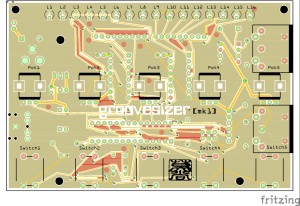
The original Groovesizer mk1 is still getting quite a bit of attention, so I’ve decided to offer it in kit form, too. I wanted to keep it simple and as close to the original as possible, but at the same time I couldn’t resist improving on some of the shortcomings of the first design. I’ve added two shift registers so that now there is an LED for each of the 16 steps – with some pins to spare broken out on an expansion header). I’ve also added a MIDI input alongside the output, so that it can be played as a standalone instrument, or synced to external devices.
Some prototype boards are being fabbed as we speak. It should be a great beginners kit with a low parts count and price.
-
Bravo, Charlie, Delta, Echo – Proof-of-concept firmware videos
The proof-of-concept firmware for the Bravo, Charlie, Delta, and Echo will go up on the site today or tomorrow. I’ve uploaded first look videos to YouTube:
Bravo:
Charlie:
Delta:
Echo:
-
Foxtrot Firmware now available
I’ve just released the Foxtrot firmware and there’s a growing implementation chart on the Foxtrot’s firmware page. It’s a MIDI controller, but far from being a one-size-fits-all controller, it’s meant specifically as a clip and scene launcher for Ableton. (And yes, it does mean there are other MIDI controller firmware planned, too.) The firmware is designed to fit in perfectly with my Ableton workflow, but I fully expect users to go in and fiddle with the firmware code to make it ideal for their own setup.
-
Steve Reichs’s Piano Phase – played on two Groovesizers
I’ve wanted to do this for a long time – finally possible with a soon to-be-released Alpha firmware update.
